
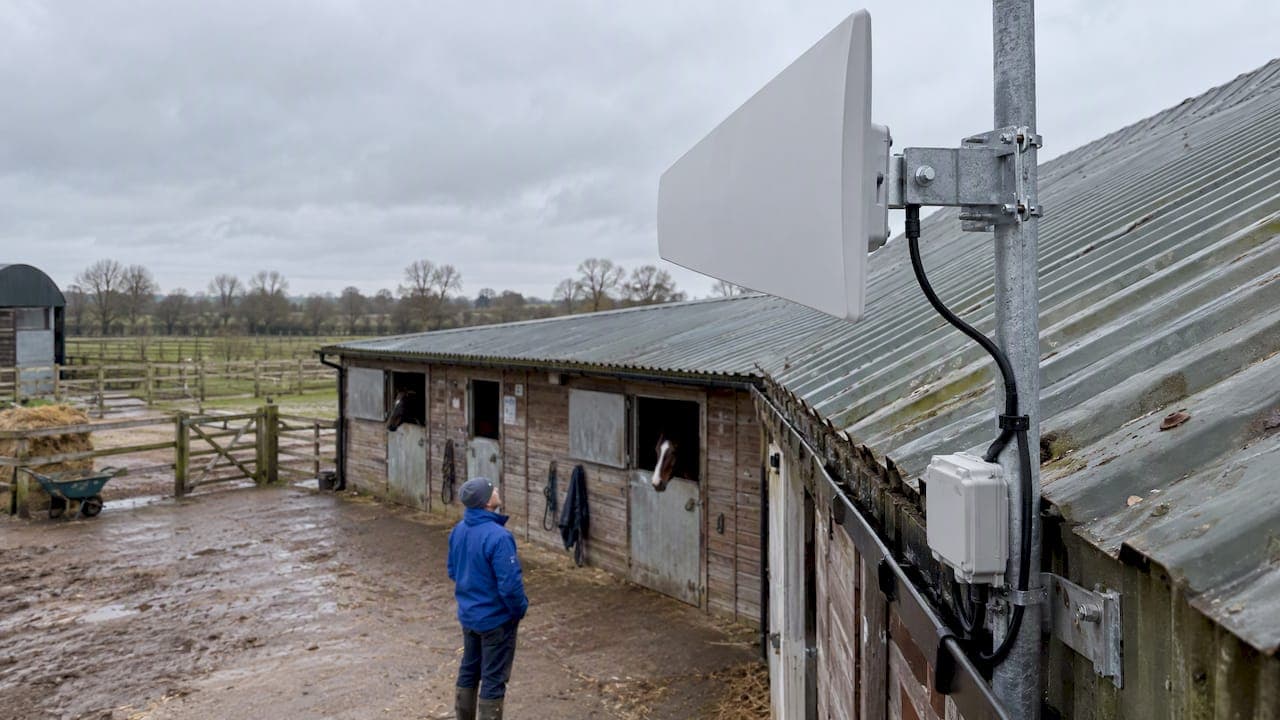
For stables with poor internet, the most reliable approach is an offline-first workflow that keeps essential records local and only syncs prioritised data when connectivity allows. Paired with pragmatic hardware choices, this keeps feeding, medication and emergency records current, keeps owners and vets informed, and keeps the yard running regardless of what the signal bars say. The rest of this guide covers quick wins, technical strategies, hardware, testing and an optional trial.
TL;DR:
- Prioritize offline workflows that keep essential records local and synchronize only critical data when connectivity improves.
- Use hardware enhancements like external high-gain antennas and bonded cellular to improve connection stability and reduce drop-outs.
- Schedule syncs during low-traffic times and compress media to minimize bandwidth use without sacrificing data accuracy.
- Focus on local data access and conflict resolution rules to ensure critical information remains current despite weak signals.
- Conduct small pilots with one barn or team before full deployment to identify potential sync conflicts and hardware needs effectively.
Table of Contents
- What "low bandwidth" looks like in a stable and why it matters
- Quick wins you can apply today to reduce bandwidth use and keep operations running
- Technical strategies: offline-first apps, sync models and data architecture for stables
- Hardware and connectivity options for rural stables
- Tools and workflows: remote support, testing and monitoring connectivity
- How EquiBETS addresses low-bandwidth stables
- Security considerations and data protection in low bandwidth stable environments
- Case studies or examples of successful low bandwidth implementations in stables
- Specific software tools and platforms optimized for low bandwidth conditions
- Author perspective: balancing pragmatic fixes with longer-term investment
- Try EquiBETS: trial and pricing links with suggested pilot checklist
- FAQ
- Sources
What "low bandwidth" looks like in a stable and why it matters
Low bandwidth is not simply "slow internet": it is a mismatch between what a task needs and what the link can deliver. The ITU has proposed that broadband access supports data rates greater than 2 Mbit/s, with lower rates increasingly common in rural areas, which is exactly where most equestrian facilities sit. Below the broadband threshold, apps built for city connections start to struggle.
Throughput is only part of the story. Latency, jitter and packet loss decide whether a task actually completes, and ITU-T Y.1540 defines the IP performance metrics (including IPTD and PDV) used to judge whether a link can support a given application. A connection can show a reasonable download speed and still be unusable if packets arrive late or out of order. In a yard, this shows up as:
- Uploads that stall halfway through a treatment video or photo set.
- Sync errors that silently fail, leaving owner portals out of date.
- Delayed messages to vets during time-sensitive cases.
- Frustration from staff who give up and revert to paper.
Video, high-resolution photos and large analytics exports are the most bandwidth-hungry tasks. Text records, medication logs and short notes cost almost nothing to send and should never be blocked by a weak signal.
Quick wins you can apply today to reduce bandwidth use and keep operations running
Before touching any hardware, a few process changes cut data use immediately and cost nothing.
- Set a text-first policy. Make text fields, checkboxes and medication logs the default entry method, and hold photos or video until a stronger connection is available.
- Schedule sync windows. Batch uploads for early morning or late evening when fewer devices compete for the same link, and avoid syncing during feeding or treatment rounds.
- Pause background backups during work hours. Large automatic backups or app updates should run overnight, not while staff are trying to log a lameness check.
- Compress and thumbnail images. Send a compressed thumbnail first and queue the full-resolution file for later, rather than forcing a large file through a thin pipe.
- Encourage short written notes over video. A two-line note on a horse's gait tells a vet more, faster, than a 40-second clip stuck in an upload queue.
Our offline horse forms guide covers how to design minimal-field forms that capture what matters without demanding a strong signal.
Pro Tip: Ask staff to log one sentence immediately and attach media later. A delayed photo is better than a lost observation.
Technical strategies: offline-first apps, sync models and data architecture for stables
The underlying architecture matters as much as the habits built on top of it. Android's offline-first guidance recommends a local data store as the canonical source of truth, with a repository pattern that guarantees reads work even when a device has no signal at all. Writes get queued locally and pushed when a connection reappears, rather than failing outright.
On top of that, sync behaviour should be deliberate rather than automatic:
- Prefetch opportunistically when a good connection appears, rather than waiting for a scheduled check.
- Queue writes locally and retry with backoff instead of hammering a weak link.
- Use delta sync, sending only what changed rather than resending whole records.
- Apply clear conflict rules for critical records: a vet's update to a medication log should take precedence over a staff note made earlier the same day, with a visible audit trail.
Not everything deserves the same priority. Emergency plans, medication changes and critical text records should sync first; ride video and detailed analytics can wait.
Local reads should always work, and repositories should treat the local data source as canonical, syncing to the network only when conditions allow.
Android's connectivity guidance for constrained networks reinforces this: prioritise text requests, detect network quality, and scale down or delay rich media rather than letting it block the queue. Our guide to offline data capture walks through how sync conflicts actually resolve in a working yard.
Hardware and connectivity options for rural stables
Software changes go further with the right hardware underneath them. A few upgrades deliver most of the improvement:
- High-gain external antennas, mounted outside on a roof line or pole rather than inside a metal-roofed barn, which otherwise blocks much of the signal before it reaches a device.
- Bonded or multi-WAN cellular, combining two SIM connections into one more resilient link, useful where a single carrier drops out unpredictably.
- Satellite as a fallback, practical where no terrestrial option reaches the property, but usually the most expensive tier.
- Wired Ethernet for admin stations, keeping the office or treatment room on a stable connection, with Wi-Fi mesh or repeaters extending coverage to barns and arenas.
- Power and surge protection, since rural networking gear fails quietly when it is left exposed to voltage spikes common on farm circuits.
The sensible order of spend is antenna and router first, bonded connectivity second, and satellite only as a last resort. Practitioner guidance on rural connectivity backs high-gain antennas and multi-link bonding as the most reliable improvements for barns and pasture locations, and recommends testing antenna placement outdoors before committing to any indoor repeater. For teams building custom tools around these constraints, partners like FlowLab specialise in low-data responsive apps suited to exactly this kind of environment.
Tools and workflows: remote support, testing and monitoring connectivity
Fixing a connection problem starts with measuring it properly, not guessing from a speed test alone.
- Log throughput, latency and packet loss, not just download speed; a link can look fast and still drop packets badly enough to break a sync.
- Keep remote support sessions lean. Lower the screen resolution, favour text or command-line tools over full remote desktop control, and adaptive session quality helps remote support stay usable on a thin link.
- Schedule support sessions for known good-signal windows rather than fighting the worst part of the day.
- Set alerts for repeated sync failures so a pattern gets flagged before it becomes a week of missing records.
- Escalate to a carrier or IT vendor when packet loss stays persistently high or a link drops out entirely, rather than treating it as a one-off.
How EquiBETS addresses low-bandwidth stables
We built offline mobile access into EquiBETS Complete specifically for yards that cannot rely on a constant connection: records can be read and written on the ground, and sync happens when a signal returns. Owner portals, emergency plans and GPS ride tracking all work with the same offline-first logic, so critical information reaches vets and owners without waiting on the weakest part of the network.
We offer an Offline First Rural Stable Connectivity free trial for Australian yards wanting to test this before committing. A useful pilot covers three things: offline reads and writes on a single device, owner portal updates syncing correctly on reconnect, and conflict handling when a medication entry is updated from two devices at once.
Security considerations and data protection in low bandwidth stable environments
Patchy connectivity does not excuse weak security, and it often makes it harder to apply the usual safeguards. Devices that spend long stretches offline still hold sensitive records: medical histories, owner contact details, financial data and emergency contacts. Encryption at rest on the device matters just as much as encryption in transit, because a lost or stolen tablet in a tack room is a realistic risk.
Authentication needs to work without a live connection too. Cached credentials with a reasonable expiry window let staff log in during an outage without leaving an account open indefinitely if a device goes missing. Role-based access stays important offline: a stable hand should not be able to edit a vet's medication notes, even when there is no server available to enforce that rule in real time, so permission checks need to live locally as well as on the server.
Sync itself is a moment of exposure. When a device finally reconnects and pushes a backlog of changes, that transfer should still be encrypted, and conflict logs should record who changed what and when, both for accountability and so a dispute over a dosage change can be traced after the fact. Backups taken during low-bandwidth periods deserve the same protection as backups taken over a fast line.

Finally, a written policy on what data gets cached locally on personal devices, and for how long, closes a common gap: many yards never actually decide this, and staff end up carrying months of sensitive records on phones that were never configured for it.
Case studies or examples of successful low bandwidth implementations in stables
The pattern across yards that get this right is consistent: they stop treating connectivity as an afterthought and start treating it as part of daily procedure. A yard that moves medication logging to a text-first, offline-capable workflow typically sees records completed on time regardless of whether the signal holds, because staff are no longer waiting on a spinner before they can move to the next horse.
Properties that paired a hardware fix, usually an external high-gain antenna mounted outside a metal-roofed barn, with an offline-first app, tend to report the biggest jump in reliability, because neither change alone solves the whole problem. The software keeps working when the link drops; the hardware reduces how often it drops in the first place.
A small, deliberate pilot before a full rollout tends to separate the implementations that stick from the ones that get abandoned. Running one barn, one team and one week of real use surfaces the gaps in a sync schedule or a conflict rule long before they affect the whole yard. Teams that skip this step and roll out to every barn at once are the ones most likely to hit a sync conflict they have no process for resolving.
The common thread is sequencing: fix the workflow and the data model first, then layer hardware improvements on top, rather than buying expensive connectivity gear and hoping it papers over a brittle app.
Specific software tools and platforms optimized for low bandwidth conditions
Not every tool handles a weak connection the same way. The practical differences come down to three things: whether an app stores data locally by default, whether it lets you write and edit while offline rather than only read cached data, and how it prioritises what gets sent first when a connection returns.

General-purpose productivity and spreadsheet tools often fail on the second point, requiring a live connection to save anything at all, which makes them unreliable for medication logs or incident records taken in a paddock. Dedicated offline-first equine management platforms solve this by making the local device the source of truth, syncing only once connectivity is confirmed.
For remote troubleshooting and support sessions, lightweight tools that favour text and command-line interaction over full remote desktop control cope far better with a thin link than standard screen-sharing software, which tends to lag or drop out entirely below a certain speed. Extreme compression techniques exist for video and audio at the far end of this spectrum, but these specialised approaches trade fidelity for connectivity and suit emergency communication more than daily record keeping.
For yards evaluating options, the questions worth asking a vendor are blunt: does the app work with no signal at all, does it queue writes locally, and what happens to a change made offline if two staff edit the same record before either device reconnects. Our stable task management guide looks at how these choices affect daily time spent on admin.
Author perspective: balancing pragmatic fixes with longer-term investment
Fix the process before the hardware. Most yards lose more time to bad habits (video-first logging, no sync schedule) than to a weak signal. Get the app configuration and workflow right, pilot it in one barn for a week, then spend on antennas or bonded cellular once you know what the software actually needs. Train staff on the sync routine; a good system fails without it.
— isaac
Try EquiBETS: trial and pricing links with suggested pilot checklist
We built EquiBETS Complete around the reality that most yards do not get reliable internet, so offline access is not a workaround bolted on top, it is how the platform works by default. Owner updates, emergency plans and medication records stay usable whether a device is online or sitting in a paddock with no signal at all.

If you want to see whether this fits your yard, a short pilot answers the question faster than reading about it:
- Pick one barn and one small team to trial for a week.
- Test offline entry for feeding, treatment and incident records.
- Confirm owner portal updates sync correctly once the device reconnects.
- Measure time saved against your current paper or spreadsheet process.
Start with our Offline First Rural Stable Connectivity trial, check EquiBETS Complete pricing at $9.99 AUD per month, or get in touch for help tailoring a setup to your property.
FAQ
What does low bandwidth mean?
Low bandwidth means a connection that carries data at a rate too low for a given task, typically below the roughly 2 Mbit/s mark the ITU has associated with broadband access. It is not just about speed: latency, jitter and packet loss all affect whether a connection actually works for a task.
How do I fix low bandwidth?
Start with an offline-first workflow so records can still be read and written without a live connection, then prioritise text over media and schedule syncs for better-signal windows. Hardware fixes, such as a high-gain external antenna or bonded cellular, help once the software side is already handling drop-outs gracefully.
What does low bandwidth mean in slang?
Outside networking, "low bandwidth" is sometimes used casually to describe someone with little capacity to take on more tasks or information at a given moment, borrowed from the technical meaning of a limited data pipe. In a stable context, the term almost always refers to the actual internet connection rather than this informal usage.
What is no bandwidth?
"No bandwidth" usually means a connection has dropped entirely rather than simply being slow, or informally that someone has no spare capacity for an extra task. For stable operations, the practical response is the same either way: rely on offline-capable tools that keep working without any live connection.
Sources
- ITU - broadband access discussion
- Build an offline-first app | Android Developers
- Zoho Assist - low-bandwidth remote desktop guidance