
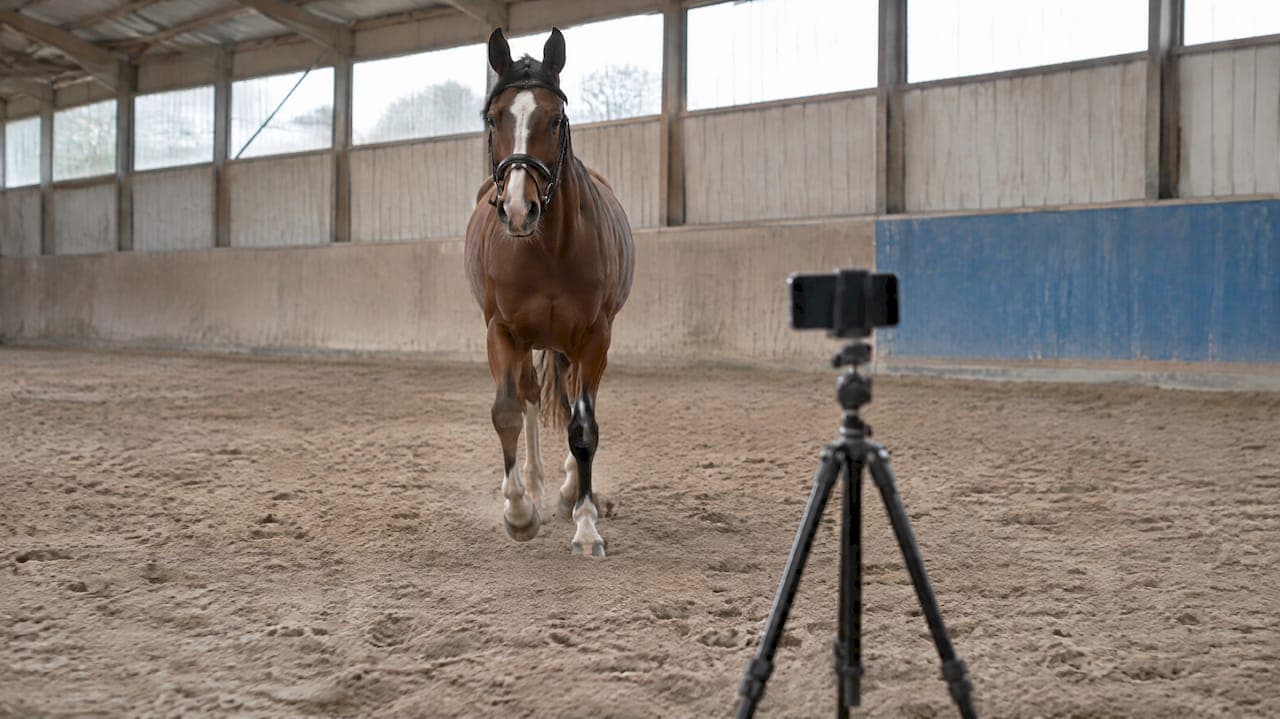
For usable horse movement footage, you need a minimum of two fixed positions: a camera facing the horse head-on for straight-line trot work, and a side-on camera perpendicular to the track. For circle work, add an inside-centre position. A tripod-mounted smartphone at 60 frames per second or higher, placed in the same marked spot every session, gives you footage that holds up for AI analysis or a vet review.
TL;DR:
- A nine angle study found observers agreed most when assessing induced forelimb lameness from head on footage; other views should support, not replace, it.
- Record at least 60 frames per second; trials found smartphone gait metrics within 2.2 millimeters of a laboratory system with 13 cameras.
- For circle work, add inside center and outside near ring views, but interpret symmetry separately because turning changes limb loading.
- Mark tripod locations, keep height and framing consistent, and label each clip; small setup shifts can make comparisons across sessions unreliable.
- Choose a multi camera rig only when a recurring clinical question needs true three dimensional joint angles; routine monitoring usually needs consistent smartphone footage.
Table of Contents
- Recommended positions and angles for straight lines and circles
- Recording settings and capture quality that hold up to analysis
- Single-camera markerless versus multi-camera 3D capture
- Mounting, alignment and a pre-session arena checklist
- Sample workflows for recording a straight-line trot and a 20 m circle
- How standardised placement feeds evidence-led AI analysis
- Keeping arena video secure and private
- Troubleshooting common placement and footage problems
- Camera equipment that works well with equine management software
- Where small yards should put their effort first
- Bring your arena footage into one evidence-led workspace
- FAQ
- Sources
Recommended positions and angles for straight lines and circles
Each camera position answers a different question about how the horse moves, so the views work best together rather than as substitutes for each other.
Positioning a camera directly in the horse's path, facing towards it as it trots, gives the clearest read on forelimb lameness. A study testing nine video angles found that the straight-towards angle produced the highest agreement between observers assessing induced forelimb lameness, ahead of every other angle tested. Researchers behind that work went further, recommending that video of the horse trotting directly towards the camera be treated as the minimum standard for forelimb assessment, with other angles providing supporting detail rather than carrying the diagnosis alone.
A side-on, perpendicular camera is the one to use for stride length, limb phasing and overall gait rhythm. Keep the camera far enough back that the whole stride cycle fits in frame without the handler walking into shot, and avoid placing it too close to the track, which introduces parallax distortion as the horse passes nearer and further from the lens.
For circle work, two positions cover most needs:
- Inside-centre, roughly at the middle of a 20 m circle, for symmetry and whole-body tracking as the horse moves around you.
- Outside near-ring, just beyond the track line, for a clearer view of hoof placement and limb flight on the side closest to the camera.
A fixed camera on a tripod beats a handheld "follow" shot for consistency, since panning introduces its own motion into the footage.
Recording settings and capture quality that hold up to analysis
Frame rate matters more than most yards assume. Fast strides move through the critical phases of a limb's flight in a fraction of a second, and a slow frame rate simply misses them. A smartphone-based study comparing single-camera markerless capture to a 13-camera motion capture system recorded at 60 Hz against the lab system's 200 Hz and still found mean differences in gait metrics to be very small across controlled trials.
A 60 fps smartphone capture can closely match a multi-camera lab rig on key gait metrics when placement is consistent, according to that 2023 MDPI comparison study. That is a strong result for equipment most yards already own.
Practical settings to lock in before every session:
- Record at 60 fps minimum; use 120 fps where your device supports it, for sharper capture of fast-motion phases.
- Shoot in landscape, with the horse filling most of the frame without cropping in and out of the full body.
- Fix exposure where the camera app allows it, so lighting changes mid-session do not alter contrast.
- Turn off digital stabilisation features that crop or warp the frame edges.
- Use the highest native resolution your device offers without sacrificing field of view.
Store raw files rather than re-compressed exports where storage allows, since re-encoding can introduce frame interpolation artefacts that interfere with later motion tracking.
Single-camera markerless versus multi-camera 3D capture
Most yards do not need a multi-camera rig for routine monitoring. A well-placed smartphone on a tripod, used consistently, is a markerless setup that performed close to a 13-camera lab system in controlled trials, which makes it a sound choice for day-to-day training feedback and soundness checks.
Multi-camera systems earn their complexity when you need true 3D joint angles rather than 2D approximations. The PFERD dataset used 10 synchronised RGB cameras alongside a 56-camera optical motion capture rig to build full-body 3D kinematics, which requires calibration and overlapping fields of view between neighbouring cameras to triangulate reliably.
Before deciding, run through this checklist:
- Do you have a recurring clinical question that needs absolute joint angles, not just visual comparison over time?
- Is the budget and staff time available for calibration, synchronisation and multi-camera storage?
- Would a single consistent camera position, repeated over weeks, answer the question just as well?
For most training and welfare monitoring, the single-camera route wins on practicality.
Mounting, alignment and a pre-session arena checklist
Consistency between sessions matters more than any single piece of equipment. A loose tripod or a camera moved six inches from last week's spot introduces variability that has nothing to do with the horse.
- Set the tripod to a fixed working height (roughly 1 to 1.3 metres for most horses) and check it is level before every session.
- Secure the mount against wind in outdoor arenas; a light gust can shift a tall tripod mid-recording.
- Mark each camera footprint on the arena surface or fence line with chalk or a cone so the position is identical every time.
- Mark start and stop lines for the straight-line run so every pass covers the same distance.
- Check for backlighting before recording. A horse moving against a bright window or open doorway loses contrast against the background, which hurts both human review and automated tracking.
Pro Tip: Photograph your marked camera positions once and keep the photo in your session notes. It takes ten seconds and removes any guesswork for whoever sets up next time.
Sample workflows for recording a straight-line trot and a 20 m circle
Having a repeatable routine written down means any staff member can capture usable footage, not just whoever set up the system originally.
- For straight-line trot, mark a 25 m line and position the front-facing camera at the far end, with the side-on camera set back from the midpoint.
- Have the handler trot the horse in-hand at a steady, even pace, running two to three passes to allow for a clean take.
- For circle work, place the inside-centre camera at the middle of a 20 m circle and the outside camera just beyond the track line.
- Brief the handler to keep a consistent circle radius and pace, since circling changes the forces on each limb and alters symmetry readings compared to straight-line data, a distinction the original angle study notes explicitly.
- Name each file with horse ID, date, exercise type and camera angle (for example, "Bramble_20260312_trot_front") so footage stays traceable months later.
How standardised placement feeds evidence-led AI analysis
The research is consistent on one point: camera placement that varies session to session undermines whatever analysis follows it, whether that is a trainer's eye or an AI model. The 2023 smartphone comparison study and the PFERD multi-camera dataset both depended on fixed, calibrated positions to produce reliable kinematic data, and that same discipline is what makes footage usable at yard scale.
We built our movement analysis around that principle. The platform applies AI-powered movement analysis to footage yards capture themselves, and because it works offline as well as online, recordings taken in arenas with patchy connectivity still get logged and queued for review. Consistent camera metadata, clear labelling and a single place to store that footage over months is what turns one good recording into a usable trend line, something a folder of mismatched clips on someone's phone never becomes.
Keeping arena video secure and private
Video of horses in training also captures people, handling techniques and sometimes visiting vets or clients, so it is worth treating footage with the same care as any other sensitive business record.
Store recordings somewhere access is controlled by login rather than left on a shared device anyone at the yard can open. If staff film on personal phones, move footage to a managed system promptly rather than leaving it to sit in a personal camera roll indefinitely. Decide early who can view footage: a trainer reviewing gait might need full access, while an owner receiving a progress update might only need the final clip or report, not the full session.
Where clips are shared with a vet for a lameness opinion, send them through a system with an access trail rather than an open messaging app, so you know who has viewed what and when. If horses are owned by multiple parties or under syndicate arrangements, be clear about who consents to footage being captured and shared before recording becomes routine. None of this needs to be complicated. It just needs a consistent rule that everyone at the yard follows, rather than an ad hoc decision made differently every week.

Troubleshooting common placement and footage problems
Most footage quality issues trace back to one of a handful of repeat offenders.
Inconsistent positioning between sessions is the single biggest source of noisy data: if the camera sits six inches left of last week's mark, comparisons across sessions stop being reliable. Marking footprints on the ground fixes this permanently.
Backlighting washes out the horse's silhouette against a bright window or open arena door, which hurts both visual review and automated tracking. Reposition the camera so the light source is behind it, not behind the horse.
Motion blur in fast strides usually means the frame rate is too low for the gait being captured. If a trot looks smeared in the canter transition, move from 30 fps up to 60 fps or higher.
Partial horse in frame happens when the field of view is set for a narrower subject. Zoom out slightly and recheck that the whole horse, including the top of the head and all four feet, stays in shot through the entire pass.
Camera drift on soft or uneven ground shows up as a slow tilt partway through recording. A tripod with splayed, weighted legs on a firm base resolves most of this, and it is worth checking level again after a few sessions on the same spot.

Camera equipment that works well with equine management software
You do not need specialised veterinary camera equipment to capture footage that integrates cleanly with a management platform. A recent smartphone with a capable camera app, a sturdy tripod rated for the device's weight, and a tripod head that locks firmly in both tilt and pan cover most yard needs.
Look for a device that supports at least 60 fps recording at your chosen resolution without dropping frames, since some budget phones throttle frame rate once storage or battery runs low. A tripod with a quick-release plate speeds up repositioning between the straight-line and circle set-ups without losing the marked height each time.
For yards running more than one camera angle per session, a simple clapperboard or a verbal timestamp at the start of each clip makes syncing footage against session notes far easier once it is uploaded. Whatever you use, the deciding factor is whether footage exports cleanly in a standard format your management platform accepts, rather than any particular brand or model.
Where small yards should put their effort first
Most of the gains in arena filming come from discipline, not equipment. Marking tripod positions, recording at 60 fps on a smartphone you already own, and naming files the same way every time will outperform an expensive camera used inconsistently.
Multi-camera 3D rigs earn their place when a clinical case keeps recurring or when you are running performance research that genuinely needs absolute joint angles. For everything else, a steady routine beats a bigger budget.
— isaac
Bring your arena footage into one evidence-led workspace
Capturing the right angles is only half the job: footage that sits scattered across phones and folders never builds into a useful record. The platform brings AI-powered movement analysis, owner portals and offline access together in one place, so a clip filmed this morning in the arena can be reviewed, compared against last month's session and shared with an owner or vet without hunting through group chats.
A practical way to start is a short pilot: pick one horse, upload a few weeks of straight-line and circle footage captured using the positions above, and let the analytics build a baseline before you decide whether to roll it out yard-wide. If you are ready to look at what is included, EquiBETS Complete is priced at $9.99 AUD per month and covers the full set of tools in one workspace.
FAQ
How many cameras do I need to film a horse trotting?
Two fixed positions cover most needs: one facing the horse head-on and one side-on and perpendicular to the track. A study testing nine angles found the head-on angle gave the strongest agreement for detecting forelimb lameness, with the side-on view adding stride and symmetry detail.
What frame rate should I use for lameness or gait analysis?
Record at a minimum of 60 frames per second, with 120 fps preferable for fast-motion phases of the stride. A 2023 comparison study found smartphone footage at 60 Hz produced gait metrics within 2.2 millimetres of a 13-camera lab system under controlled conditions.
Can a smartphone replace a multi-camera motion capture system?
For routine training feedback and soundness monitoring, a well-placed smartphone on a tripod performs close to multi-camera systems in controlled research. Multi-camera rigs remain better suited to cases needing true 3D joint angles, such as the setup used in the PFERD dataset.
Does filming a horse on a circle give different results to a straight line?
Yes. Circling introduces centripetal force that changes limb loading, so symmetry metrics from circle work should be read differently to straight-line metrics rather than compared directly, a distinction researchers behind the original angle study point out directly.
How do I keep arena footage secure if multiple staff film horses?
Store recordings in a system with login-based access rather than on personal devices, and set clear rules about who can view or share clips, particularly where owners or vets are involved. Moving footage off personal phones promptly into a managed platform reduces the risk of it being lost or shared without consent.